Google Ads AI Agent

Your Google Ads account,always working toward the target.

Give Akacia.ai your KPI, budget and guardrails. The agent analyses the account, makes the decisions and optimises toward your goal, around the clock, and emails you every change.

Get Your Free Audit
$10 of free AI credit on the $99 plan. Cancel any time.
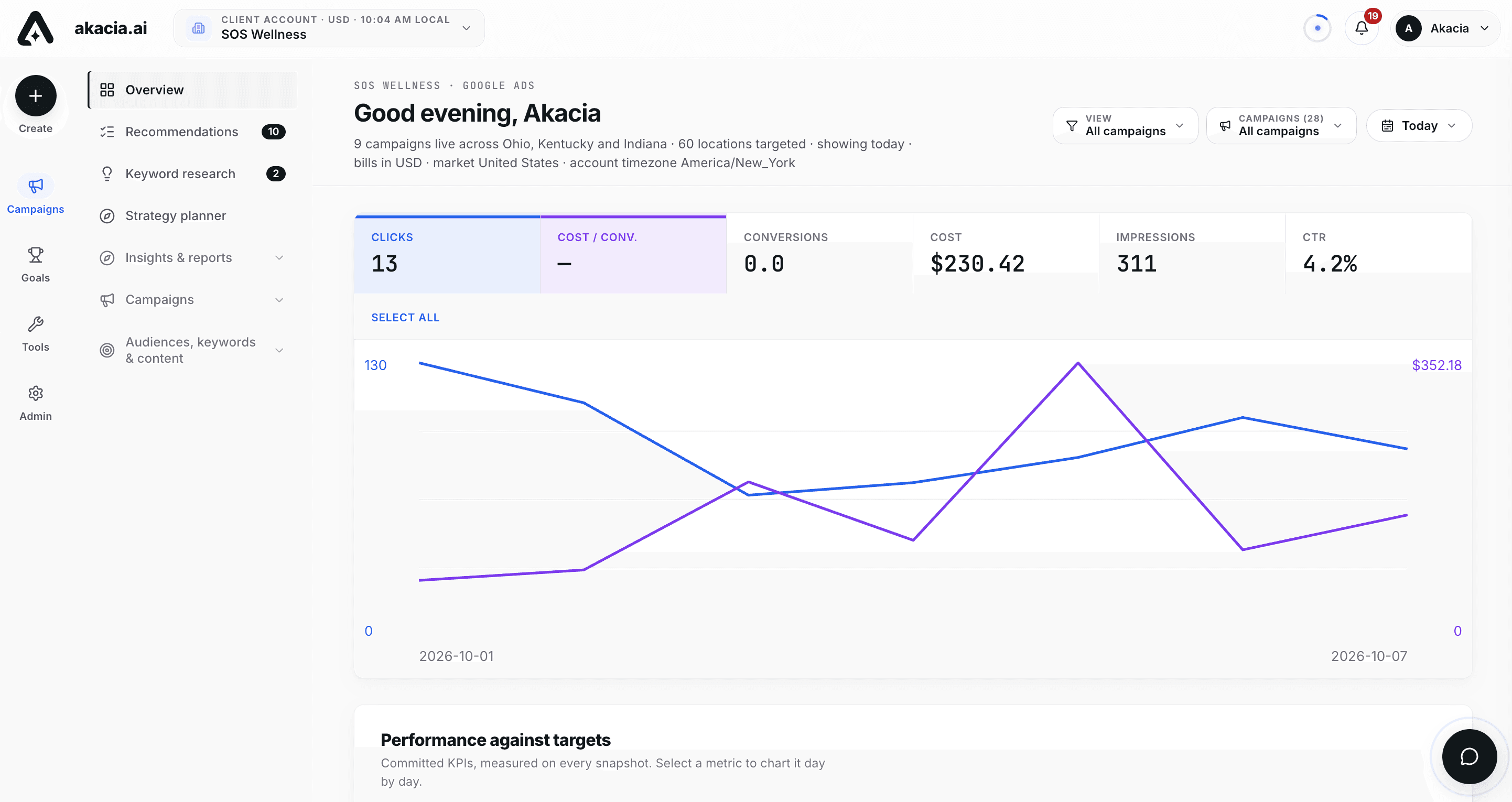
app.akacia.ai / overview
The Akacia.ai portal Overview
  • A specialist agent built only to make Google Ads perform. Not a general AI tool that reports and suggests
  • It works the account 24 hours a day: researches the market, adds and removes keywords, writes ads, builds campaigns and optimizes toward the agreed goals
  • It does its own research with live internet access and full knowledge of the account
  • Every time it changes something, the client gets an email saying what was done and on which campaign
  • It works in restricted categories such as healthcare, and handles Google's policy review and exemption requests for restricted keywords
  • It is like having a team of Google Ads specialists on the account around the clock
  • It is proven on live accounts that Turn Up Technologies manages today
  • It is not a magic wand. The agent brings the right traffic, and the landing page turns it into customers. We guide both, and the client has to follow the recommendations on landing page, budget and strategy

What Akacia.ai Does for Google Ads

  • Works on a whole account or on selected campaigns only

  • Drafts the complete strategy from your goals and waits for your approval before anything runs

  • Takes instructions by chat or by voice through Megan, the built in assistant

  • Runs on autopilot toward the approved strategy, around the clock

  • Makes changes directly in Google Ads: campaigns, ad groups, keywords, ads, budgets, bidding, locations, audiences and conversions

  • Stays inside the permissions and budget ceilings set for each account

  • Logs every change with who, what and when

  • Manages many client accounts from one workspace, each with its own rules

  • Shows live data from Google Ads, refreshed every minute

The Five Key Features

Most AI ad tools give you a dashboard and a subscription. Akacia.ai gives you an agent that does the work, a plan that is realistic before you pay, and a person who sets it all up with you. These five features carry the whole offer.

01

Autopilot That Works Toward Your Goals

  • You set the goals and objectives once. The agent works toward them around the clock
  • It acts on the account itself: keywords, negatives, ads, campaigns and recommendations, inside the limits you set
  • It learns from what the ads actually do. Every change is logged with the result it expects, judged on real numbers, kept if it delivers and changed if it does not
  • It checks the account every 15 minutes and works from live data
  • It emails you every time it changes something, so nothing happens behind your back
02

An Agent You Can Speak and Chat With, 24/7

  • Megan answers by chat or voice at any hour, from the live account data
  • Ask why a campaign is not performing, what changed or what to fix first, and get real time analysis
  • Give an instruction in plain words and she makes the change, confirms it and verifies it landed
  • No tickets and no waiting for a reply
03

Strategy Planner

  • State your goals in plain words and Akacia.ai drafts the complete strategy from those goals and the live account numbers
  • It covers objectives, audience, campaign plan, keyword themes, a phased roadmap and the KPIs the agent is held to
  • Nothing runs until you approve it, and you can rework it at any time
04

Pre Deployment Support: A Realistic Plan Before You Spend

  • Before anything is deployed, we audit the business: website, landing page, budget, goals, click costs, competition and seasonality
  • You receive a realistic approach to your goals: what the budget can deliver and what has to change
  • If the numbers cannot work, we say so before you spend anything
05

A Real Person When You Want One

  • Set the account up yourself in six guided steps, or contact us and a specialist does it with you: the connection, the strategy, the goals and the training of the agent
  • They make sure Akacia.ai knows exactly what your goals and objectives are
  • Support is one message away

Three Working Modes

Each mode has its own switch per client account, so one client can be read only while another runs on full autopilot.

01

Assistant

Megan reads all the data in the account and answers questions in chat or on a voice call: what is happening, why a campaign is not working, what to fix first. Read only.

Switched on byAny admin
02

Agent actions

Megan changes the account on instruction, by chat or voice. She collects every required input, confirms, executes and then verifies that the change landed.

Switched on bySuper admin or agency admin
03

Autopilot

The agent works on its own toward the approved strategy. It applies what the permissions allow and emails a person about the rest.

Switched on bySuper admin or agency admin

Megan, the AI Assistant

Megan is the chat and voice assistant inside the portal. She works from the live account data and can act on it when agent actions are switched on.

What you can ask or tell her

  • Ask what is happening in the account, why a campaign is underperforming and what to fix first
  • Tell her to create, copy, pause or change a campaign
  • Tell her to add keywords, add negatives, write new ads or change bidding
  • Approve a recommendation or ask what the agent did today
  • Use the chat button on any page of the portal, or take the conversation onto a voice call

How she is shaped for each client

  • Assistant name, personality and tone
  • Style rules for answer length, format and how much detail to lead with
  • Topics she stays away from, and the exact wording she uses when she has to decline
  • Ten speaking voices for calls, each with a preview
  • AI model tier chosen per client account, from an economy tier up to a top specialist tier
  • Test drive: run a real question through her with unsaved settings and see the effect before saving

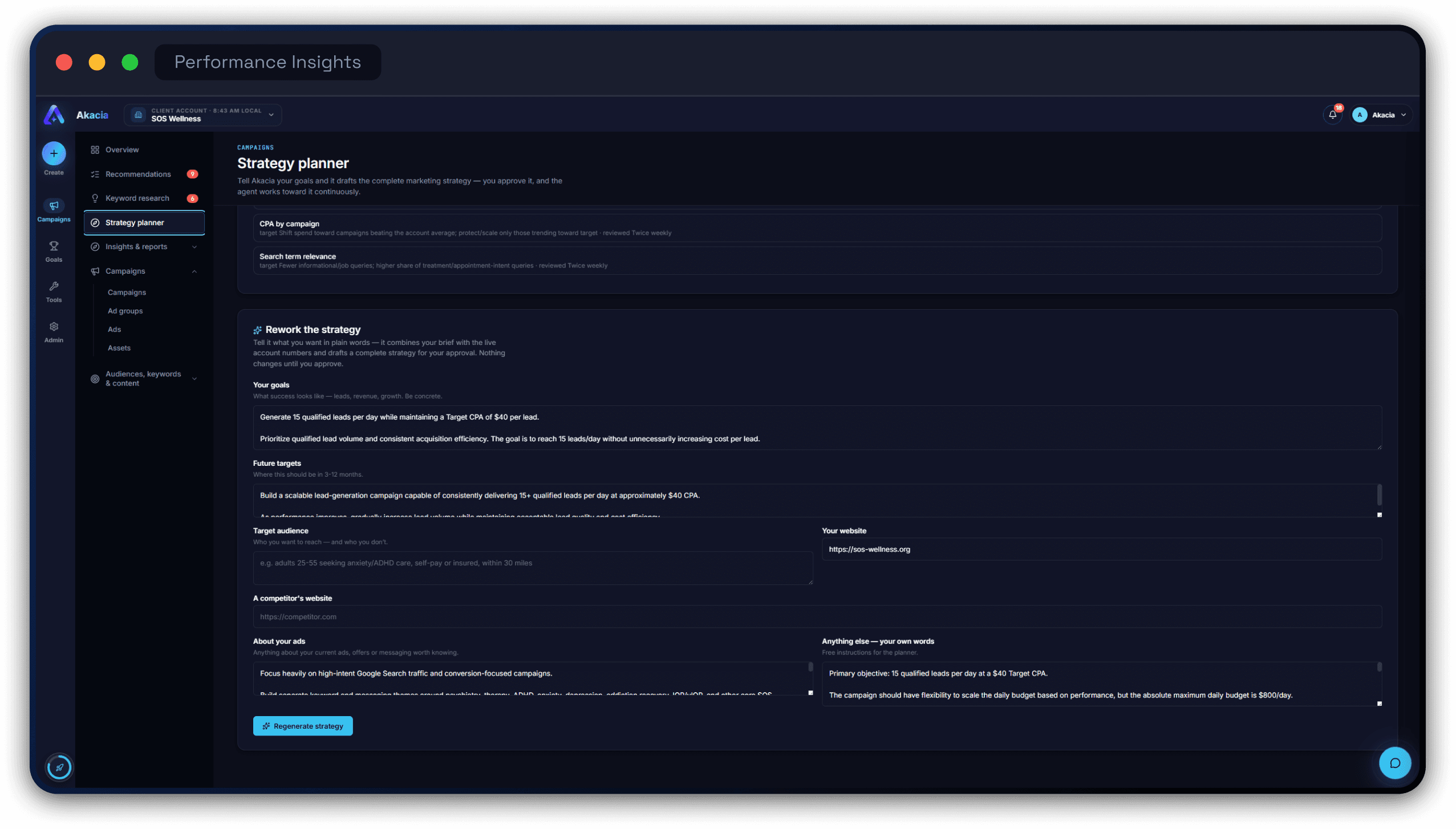
Strategy Planner

You state the goals in plain words. Akacia.ai combines them with the live account numbers and drafts the complete strategy. Nothing runs until you approve it. Once approved, every analysis and action the agent takes is steered toward it.

What you give it

  • Goals: what success looks like in leads, revenue or growth, stated concretely
  • Future targets for the next 3 to 12 months
  • Target audience, including who not to reach
  • Your website and a competitor's website
  • Notes on current ads, offers and messaging
  • Any other instruction in your own words

What it drafts

  1. Executive summary: where the account stands against the goal and the biggest lever to pull
  2. Objectives
  3. Audience and positioning: who to reach and how to win against competitors
  4. Campaign plan across existing and new campaigns
  5. Keyword themes per service line, with match type guidance and negatives
  6. Roadmap in phases, from stabilizing the account to scaling it
  7. The KPIs the agent is held to, each with a target and a review cadence
  8. Rule conflicts: where the brief asks for something the agent's training forbids, the plan takes the compliant route and shows which rule was kept

The strategy can be approved, modified or regenerated at any time. Long jobs such as drafting a strategy run in the background and keep running if you leave the page.

A drafted strategy in the Akacia.ai Strategy planner, with the Approve button

Knowledge Base

The knowledge base is the agent's memory for each client.

  • Upload keyword lists, briefs, brand guidelines, offers, price sheets or any other document
  • The agent draws on them when it drafts strategy, analyzes the account and answers in chat
  • Private to each client account

Action Library: What It Can Change in the Account

The library holds 64 actions. Megan and the autopilot can run 37 of them directly, and the rest are done from portal pages. Say it in chat and Megan collects the inputs, confirms, executes and verifies.

  • 64Actions in the library
  • 37Run directly by Megan and the autopilot
AreaWhat it can do
CampaignsCreate a Search campaign. Create a campaign from an existing one (copy, adjust, publish). Enable, pause and resume. Rename. Update the daily budget. Change the bidding strategy, target CPA or target ROAS. Change portfolio strategy targets. Update locations, languages and ad schedule. Move budget between campaigns with automatic rollback. Remove a campaign, with exact name confirmation.
Ad groupsCreate. Rename, pause, enable and set max CPC. Move keywords between ad groups (Smart Move). Remove.
KeywordsAdd with match type. Pause, enable and remove. Set a keyword level max CPC bid. Find converting search terms that are not yet keywords. Research keywords from competitors with live Keyword Planner data. Promote search terms to exact keywords (Smart Move).
Negative keywordsAdd at campaign or ad group level. Remove from a campaign, ad group or shared list. Create, fill and attach shared exclusion lists. Detect wasteful search terms and recommend them as negatives.
Search termsIdentify converting, wasteful and competitor searches. Turn a search term into a keyword inside its own dedicated ad group (Smart Move).
AdsCreate responsive search ads. Generate headlines, descriptions and variations. List, pause and enable. Replace a weak ad by creating the new one and pausing the old. Remove.
AssetsCreate and link sitelinks, callouts and structured snippets. Detect missing assets.
BudgetsIncrease, decrease or set a budget within the cap. Shift budget from losing campaigns to winners, with a preview before applying. Create and assign shared budgets.
LocationsTarget or exclude any city, region or country. Location bid adjustments from -90% to +900%. Remove a location. Profitable versus wasted cities analysis.
AudiencesAttach and detach audience segments.
DevicesDevice bid adjustments from -90% to +900%.
Ad scheduleCreate serving windows by day and hour. Best hours and days analysis.
ConversionsCreate a conversion action. Set it primary or secondary. Enable, hide or remove it. Detect conversion drops and tracking failures.

Every action in the library shows a tag for the current account: the agent can do it, humans only, or portal page. The tags follow the permissions set for that client.

Autopilot

With autopilot on, the agent runs the account by itself inside the limits you set. Each run follows three steps.

  1. 1

    It looks

    About every 10 minutes it collects Google's recommendations, the keyword strategist's changes and the account analyst's advice.

  2. 2

    It acts

    Anything new that the permissions allow is applied and marked done. Your training shapes what it puts first.

  3. 3

    It reports

    One structured email per run covers what it did and the few things only a person can do, with critical items flagged.

  • Scope: the whole account, or only the campaigns you tick, with everything else left untouched
  • Money switch: budgets and bidding stay off limits unless an admin allows them, and even then each change stays inside the per change cap. With the switch off, money items are emailed to a person
  • Run now on demand, or Preview to see every decision with no changes made
  • Scheduled and manual runs, each logged with what was applied, what was escalated and why, and what failed
  • Live activity board showing the queue, the step in progress, what was applied and what went to a person
  • A 7 day ledger, so the same recommendation is never processed twice

Training: Standing Orders and Recurring Tasks

The agent is trained per client account with two sets of plain language instructions. Training shapes every decision but can never override the safety rules.

Standing orders: rules it always follows

  • Never raise a daily budget above a set amount
  • No budget or bidding changes on weekends
  • Judge everything by cost per lead, not clicks
  • Leave a new campaign alone for its first 14 days
  • Any other rule, written one per line in your own words

Recurring tasks: jobs it does on every pass

  • A full account health check every 15 minutes, around the clock
  • An urgent alert when form submissions stop during business hours while ads are still getting clicks
  • Adding search terms that contain words such as free, jobs or salary as negatives
  • Keeping impression share lost to budget under a set level and recommending budget when it grows
  • Flagging any keyword whose cost per lead runs at twice the target for two weeks
  • Checking that every enabled campaign has at least two enabled ads

Where a task needs a permission the agent does not have, the item lands in your email and the account is left alone.

Strategy Journal

Every change the agent applies is logged with the result it expects, given time to work, then judged on real numbers on a set date. It is kept if it delivers and changed if it does not, until the target is hit. A change replaced by a newer strategy is marked as superseded.

Account Review and Action Center

Three sources of work feed the agent around the clock: an AI account analyst, an AI keyword strategist and Google's own recommendations. Everything they find lands in one action center.

  • AI account review every 6 hours, with a plain language verdict on the account and the biggest lever to pull
  • Recommendations organized campaign by campaign, with Google's and the AI analyst's side by side
  • Each item carries an impact level (high, medium, low) and a category (keywords, ads and assets, bidding, budgets, structure)
  • Each item carries a status: done by agent, for your review, waiting for the agent's next pass, needs a human with the reason stated, or failed
  • Approve or dismiss any item in one click, with dismissed items kept in their own view
  • Google optimization score tracked on the same screen

Keyword Strategist and Keyword Research

  • Reviews every positive and negative keyword in the account
  • Reports paid ranking per campaign: impression share, top of page share, absolute top share, and how much is lost to rank versus lost to budget
  • Finds converting searches that one of your own negatives is blocking and removes the block
  • Lists the changes that would rank you up, each with a priority and a target campaign
  • Spots competitors appearing in your real search terms
  • Keyword research on live Keyword Planner data, seeded with a competitor URL, your own seed keywords or both, for any city, region or country
  • Competitor sightings: scans 30 days of search terms for competitor names that triggered your ads, with what each cost
  • Keyword register: every keyword and negative added or removed, with who and when

Monitoring and Alerts

  • 14 findings checks running continuously across CPA, spend, search terms and conversion drops
  • Findings surfaced in the action center, the notification bell and email
  • Conversion drop and tracking failure detection
  • Smart Actions loop: ask what should be fixed and the agent detects the problem, finds the cause, recommends a fix, waits for approval, executes and verifies
  • KPI scorecard: the committed targets for conversions per day, cost per lead, conversion rate, CTR, CPC and spend per day, each marked on or off target with its trend against the prior 7 days
  • Snapshot archive: every monitoring run stored with its findings by severity
  • Account boost: one percentage showing how fully set up and optimized the account is

Permissions and Limits

An admin decides exactly what the agent may touch for each client. The limits are enforced in code on chat, calls and autopilot alike, and are not left to the AI's judgment.

Permission familyActions covered
Create and copy campaigns2
Pause, enable and rename campaigns and ad groups4
Budget changes and moves2
Bidding strategies and bid adjustments5
Keywords and negative keywords7
Ads: create, pause, enable2
Locations, languages, schedule and audiences6
Conversion actions2
Apply or dismiss Google recommendations (also gates the autopilot)2
Permanent deletions3
  • Each family is switched on or off per client account. A family that is off can be neither seen nor executed by the agent, which offers to email a person instead
  • Three presets to start from: trained agentic AI (recommended), full access, and keywords and recommendations only
  • Hard daily budget ceiling for the whole account. The total of all enabled campaign budgets can never be raised past it by Megan or the autopilot
  • Budget change ceiling: a maximum percentage for any single change, with a platform default of 30%
  • Named email recipients for every autopilot report and every escalation
  • Optional email note for every change Megan makes in conversation

Safety Rules That Are Always Enforced

These apply whatever the settings are.

  • Every figure comes from the account data. No invented numbers
  • Actions run only when that account's switch is on. Otherwise the agent is strictly read only
  • Before any action the agent collects every required input and confirms
  • New campaigns and ads are created paused
  • Budget moves respect the ceiling and roll back automatically if they cannot complete
  • Removing a campaign needs exact name confirmation
  • Bulk changes are all or nothing
  • One account per assistant. Requests that reach across client accounts are refused
  • Instructions hidden inside ad copy or search terms are ignored

Audit Trail

  • Action log: every action run by a person or the agent, with when, what, by whom and through which route
  • Agentic action stream: every change Megan or the autopilot made, also shown in the notification bell
  • Autopilot run log: every applied, escalated and failed item
  • Keyword register: every keyword and negative added or removed, with who and when
  • Change history: the account's own Google Ads change record grouped into readable edit bursts, searchable and filterable by operation and by editor

The Portal, Page by Page

Everything the agent does can also be seen and done by hand in the portal, live from Google Ads. Changes made on a page apply to the account immediately.

Akacia.ai portal screens: recommendations, strategy planner and keyword research
Campaigns8
Overview
Headline KPIs with a chart, performance against targets, the campaigns table, and top ad groups, keywords, searches, devices, days and hours, demographics, locations and negatives. Filters for view, campaign and date.
Recommendations
The action center, with the AI account review and Google's recommendations.
Keyword research
Keyword strategist review, keyword research, competitor sightings and the keyword register.
Strategy planner
The live strategy, the knowledge base and the form to rework the strategy.
Campaigns
Structure and performance of every campaign. A management drawer to set the budget, pause or enable, and manage ad groups, keywords, ads, locations, negatives and settings. New campaign. Conversion tracking status, assets by type and negative keyword coverage per campaign.
Ad groups
Search, filter and sort every ad group. Pause, enable and create.
Ads
Every ad shown as the search result it becomes, with policy status and performance. Filter by status or policy issue. Pause and enable.
Assets
The asset library by type: sitelinks, callouts, structured snippets, phone numbers, text, images and videos. Create assets and link them to a campaign.
Insights and reports4
Insights
When people search: best converting day and hour, hours with zero conversions, spend by hour and day of week. Devices, age and gender. Geography, with converting locations and locations that spend without converting. Search terms. Landing pages.
Search terms
The real searches that triggered the ads, with impressions, clicks, cost and conversions.
Reports
A finished figure for every calendar day, with a per campaign breakdown, plus the snapshot archive.
Change history
Every change in the account and the recommendations Google is currently surfacing.
Audiences, keywords and content4
Search keywords
Every keyword with match type, status, quality score, clicks, cost, conversions and cost per lead. Add keywords to any ad group.
Negative keywords
Every exclusion across campaigns and shared lists.
Audiences
Performance by age and gender.
Ad schedule, Locations, Devices
Serving windows and best hours, profitable versus wasted cities, and performance by device.
Goals2
Conversions
Every conversion action with its category, primary or secondary role, status and 7 day count. Create new conversion actions.
Measurement
How conversions are counted: primary actions drive bidding, secondary ones are observed only.
Tools10
Audience manager
The account's audience segments, attached to campaigns to target or observe.
Exclusion lists
Shared negative keyword lists: build once, fill, attach to any campaign.
Location manager
Search any city, region or country and target or exclude it per campaign.
Policy manager
Ads disapproved or limited by Google policy, with a direct pause control.
Ad preview and diagnosis
Every ad rendered the way Google shows it, with its policy and serving state.
Bulk actions
Pause, enable or apply a budget percentage change across many campaigns in one operation. Bulk upload of up to 200 keywords.
Shared budgets
One daily budget spent across several campaigns: create and assign.
Bid strategies
Portfolio bid strategies that steer several campaigns together: create, edit targets, assign.
Adjustments
Device bid adjustments per campaign for mobile, desktop and tablet.
Budgets overview
Committed daily budget, spend and pace. Move budget between campaigns. Budget, bid strategy, spend and conversions per campaign.
Admin4
Agent settings
Assistant, autopilot, training, permissions, alerts and limits, and test drive.
Agent activity
Live activity board, strategy journal, recent runs and the agentic action stream.
Action library
Every action the agent and portal can execute, searchable, with the action log.
Users
Super admins, agency admins and the client users of each account.

How the Three Layers Work on One Account

  1. 1
    The client or the agency sets the direction. They enter goals, audience and details about their ads in the Strategy planner, and Akacia.ai drafts the strategy for approval.
  2. 2
    The agent works toward that strategy. Megan and the autopilot act on it inside the permissions and limits set for the account.
  3. 3
    The super admin adds a safeguard. In Agent settings we write the standing orders and recurring tasks for each account, matched to the client's objective, so the account stays aligned even if the brief is thin.
  • Account switcher in the top bar for anyone with more than one account. Every page, setting and rule follows the selected client account
  • Each client account keeps its own agent settings, training, permissions, limits and knowledge base
  • Each account is shown in its own local time
  • Notification bell for agent actions and alerts
  • Profile page for name, title and password

Where Other Tools Fail: Onboarding

Most companies selling AI ad tools care about the subscription fee. They take the payment, hand over a dashboard and leave the customer to work out the setup, the strategy and whether the goal was ever realistic. That is where customers fail, and it is where Akacia.ai is built differently.

StageTypical AI ads toolAkacia.ai
Before you paySign up and pay the subscription.An optional free audit of the business and a realistic forecast.
Your goalsAccepted as typed, realistic or not.Checked against budget, market and website, then adjusted to what is achievable.
SetupYou connect and configure everything yourself.Six guided steps, including the Google Ads connection, or a specialist does it with you on a call.
StrategyGeneric defaults.Written for your business and approved by you.
If it cannot workYou find out after spending.The free audit tells you before you pay, along with what would fix it.
After launchTickets and help articles.Megan at any hour, and a real person one message away.

Akacia.ai Compared With an AI Tool and an Agency

Compared onTypical AI ads toolTraditional agencyAkacia.ai
Who does the workYou, following its suggestions.A team, during working hours.The agent, 24 hours a day, with real people behind it.
Speed of changesAs fast as you apply them.When the team gets to it.Within minutes, with an email for each change.
Asking questionsHelp articles and support tickets.Emails and scheduled calls.Megan by chat or voice at any hour, and a real person one message away.
StrategyTemplates and generic automation.Written by the team.Drafted from your goals and live account data, approved by you.
Before you paySign up and subscribe.A proposal and a retainer.A free audit and a realistic forecast if you want one. A clear no if it cannot work.
VisibilityA dashboard.A monthly report.Every change logged, emailed and reviewable, plus live dashboards.
ControlSettings you configure yourself.Limited.Permissions, budget ceilings and an autopilot switch per account.
LearningFixed rules.Depends on the person.Each change is measured against its expected result, then kept or changed.

The comparison describes how these options usually work.

Two Ways to Start

A visitor can start in two ways: find out first with the free audit, or sign up straight away. Agencies sign up the same way.

01

Fit Check Tool

Who it suits

Visitors who are unsure Google Ads is right for them, or whose budget is small

What happens

About 10 questions, then a short proposal by email within hours.

Get Your Free Audit
02

Start Now

Who it suits

Visitors who are convinced and want to manage the account themselves

What happens

Create an account, choose a plan, pay by card and connect Google Ads. The login arrives by email the moment the account is linked.

Start Now

Onboarding in Six Steps

Every account starts the same way, in one sitting. A specialist can walk through it with you on a call if you prefer.

StepWhat you doWhat Akacia.ai does
1. AccountEnter your company or agency name, work email and a password.Saves your progress, so you can stop and come back to the same step.
2. PlanChoose Akacia.ai at $99 a month or Akacia.ai Unlimited at $499.On the $99 plan, adds $10 of free AI credit to your balance.
3. PaymentPay by card on Stripe’s secure checkout.Starts your monthly subscription; cancel any time from Billing.
4. Connect Google AdsEnter your Google Ads customer ID.Sends a manager request through the official Google Ads API.
5. ApprovalAccept the request in Google Ads (Admin → Access and security → Managers).Creates your portal login and emails you the sign-in link.
6. Account auditOn your first sign-in, answer the audit questions about your business.Sets up your core strategy, daily budget cap and target cost per result from your answers.
  • Only an admin of the Google Ads account can accept the manager request, which is what keeps the connection safe
  • More Google Ads accounts can be linked from the portal at any time, on either plan

Connecting Google Ads

During sign-up: the client enters their Google Ads customer ID, Akacia.ai sends a manager request through the official API, and the client accepts it in Google Ads. The portal login is created the moment it is accepted

More accounts: linked the same way from the portal at any time

No ad account yet: create one in Google Ads first, or contact us and we set it up with you

Pricing and Payment

Two plans, each with the whole platform. The difference is how AI work is paid for.

Akacia.ai, $99 a month
$10 of free AI credit, then top up from $5. Credit never expires.
Akacia.ai Unlimited, $499 a month
Unlimited AI credit. Nothing to top up.
Payment
By card at sign up through Stripe, billed monthly. Cancel any time from Billing.
Ad spend
Not included. You pay it directly to Google.
Refunds

If the plan we approved with you cannot be delivered, the Refund Policy applies.

Refund Policy
From $99per month

Included in both plans

  • The full portal and every tool
  • Megan by chat and voice
  • The Strategy planner
  • Autopilot, keyword strategist and account analyst
  • An email report on every change
  • A free audit and strategy before the agent goes live
  • Insights and reports
  • Unlimited users and linked Google Ads accounts
Not included: ad spend, which the client pays directly to Google.

Agencies

Agencies sign up the same way as anyone else. One subscription covers every Google Ads account the agency links, and Akacia.ai Unlimited removes metering across all of them.

What agencies get

  • One workspace for every client ad account, with a switcher
  • Full control of the agent on each account: agent actions, autopilot, permissions, training and budget limits
  • Logins for their clients, who see their own account only
  • Admin access for their team, account by account
  • Unlimited linked accounts on either plan

The agency flow

  1. Sign up and choose a plan.
  2. Pay by card.
  3. Connect the first client account. The login arrives by email.
  4. Link more client accounts from the portal.
  5. Add the team and give clients their own logins.

Set your KPI. Let Akacia.ai run.

A free, honest answer within hours.

Give Akacia.ai a target.